
Mobile learning game · Paid contract
Kana Fighter
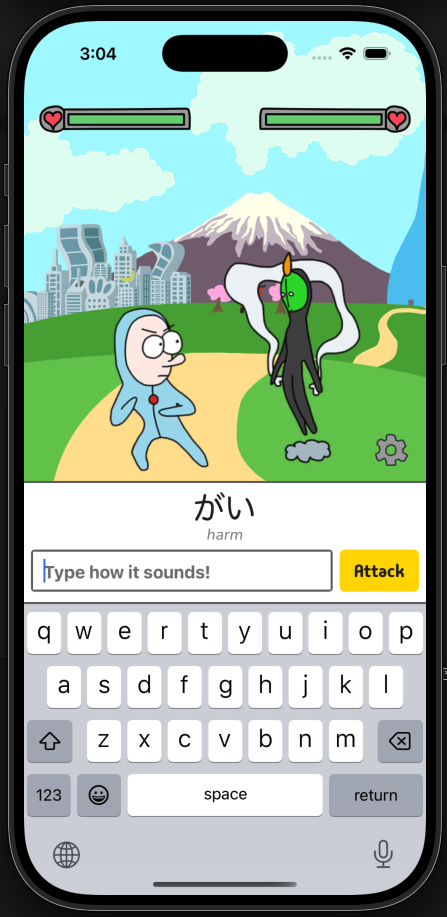
A game-based mobile application that helps first-time Japanese learners practice Hiragana and Katakana through guided lessons, drills, pronunciation audio, battles, and sequential progression.
- Role
- Contract React Native Developer & Technical Lead
- Team
- 1 developer · 1 owner and content creator
- Period
- Status
- TestFlight beta · Preparing for App Store release
Measured outcomes
- 10
- TestFlight testers
- iOS + Android
- Validated build targets
- Offline
- Local-first progress
Testing included Japanese learners, developers, and people connected to the owner.
The Android build was validated locally but was not distributed through Google Play testing.
Learning state and progression are stored on the device.
Context
Memorizing Hiragana and Katakana can feel repetitive and disconnected from meaningful progress for first-time Japanese learners.
Dylan Wood defined the learning concept, pedagogy, Figma design, character artwork, and original visual and audio assets.
I was responsible for translating that creative direction into a complete React Native application and maintainable technical architecture.
The application needed to connect lessons, pronunciation, drills, typed-answer battles, stories, animation, audio, and sequential progression without depending on a backend service.
Development included pauses while new visual assets were produced, making a sustainable asset-production boundary especially important.
Users
- People beginning Japanese study with no prior Kana knowledge.
- Learners using an English-language interface to study Hiragana and Katakana.
- TestFlight participants evaluating learning flow, readability, progression, and device behavior.
My responsibilities
- Technical planning and application architecture
- React Native, Expo, and TypeScript development
- Screen implementation from the owner’s Figma designs
- Navigation and learning-flow orchestration
- Local persistence architecture
- Drill and Quest game logic
- Progression and unlock state
- Animation, gesture, and audio integration
- Python-based asset processing and optimization
- Responsive interface implementation
- EAS and native build configuration
- iOS and Android build validation
- Manual testing and TestFlight issue resolution
Constraints
- The product concept, pedagogy, learning content, Figma design, and original visual and audio assets were owned by Dylan Wood.
- Progress needed to persist locally without authentication, a backend, or a network connection.
- Learning, story, battle, and unlock states had to remain consistent across navigation and application restarts.
- Frame-based character animation needed to remain responsive on the iPhone SE and older iPhone models.
- Animation, audio, health changes, answer input, and result navigation needed to occur in a controlled sequence.
- Raw player and opponent frames required consistent composition, dimensions, layering, naming, and optimization before integration.
- The interface needed to remain readable across different screen sizes, safe areas, and keyboard states.
- iOS deployment was performed through the owner’s account.
- Android builds were validated but were not distributed through Google Play testing.
Implemented features
- Guided intro story and contextual tutorial
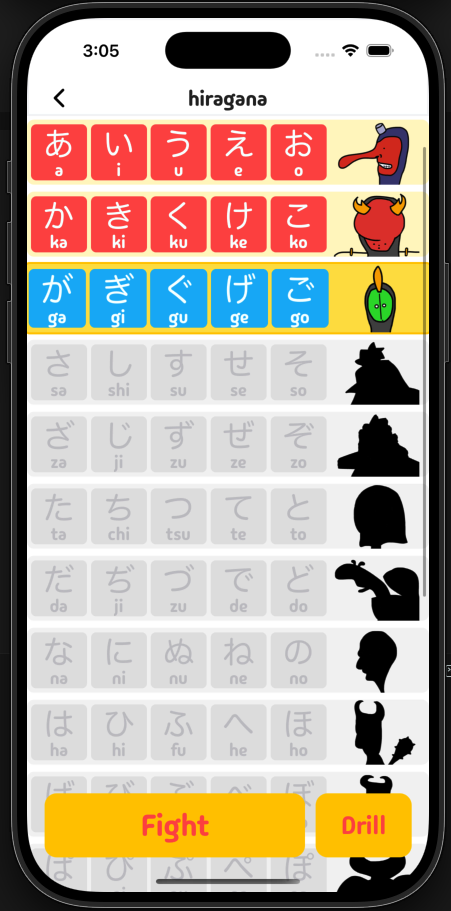
- Hiragana and Katakana learning maps
- Fifteen progression rows for each Kana mode
- Basic Kana, Dakuten, and Handakuten content
- Kana detail screens with Romaji and pronunciation audio
- Swipe navigation between Kana details
- Kana-to-Romaji multiple-choice drills
- Randomized Drill questions and answer order
- Correct and incorrect Drill feedback
- Row-level high-score persistence
- Typed-answer Quest battles
- Accepted Romaji answer normalization
- Player and enemy health systems
- Character attack and damage animation
- Background music and effect audio
- Input locking during battle feedback
- Intro, pre-battle, and post-battle stories
- Sequential row and mode unlocks
- Victory, defeat, and retry flows
- Hiragana completion and Katakana unlock
- Shareable completion certificate
- Background and effect-sound settings
- Local progress reset
- Google Form feedback and email bug reporting
- Offline learning after bundled assets are available
A learning loop built around visible progress
Each activity prepares the learner for the next step instead of presenting disconnected exercises.
Learn
Explore a Kana row with its characters, Romaji readings, and structured lesson content.
Listen
Use pronunciation audio to connect each visual character with its sound.
Drill
Practice recognition through randomized multiple-choice questions and immediate feedback.
Battle
Recall the answer by typing Romaji during a character-based Quest encounter.
Receive feedback
See the answer, animation, audio response, score, and health change as one controlled sequence.
Unlock
Complete the row, preserve progress locally, and open the next stage of the learning path.
From original artwork to application-ready animation
A Python and Pillow pipeline removed repetitive composition work while keeping creative ownership with the owner.
Original artwork
Dylan Wood creates the characters and original action frames while retaining control of the visual direction.
- Owner-created frames
- Player actions
- Opponent actions
- Transparent PNG
Automated preparation
The processing tool validates naming and dimensions, aligns player and opponent frames, applies layering rules, and creates consistent combined sequences.
- Python
- Pillow
- Frame validation
- Layer composition
Output optimization
Processed assets receive consistent bounds and naming so they can be reviewed and mapped into the application without repeated manual adjustment.
- Cropping
- Resizing
- Contact sheets
- Predictable filenames
Runtime preparation
The application collects and preloads only the animation frames required for the current Kana row before interaction begins.
- Static asset maps
- Expo Asset
- Row-specific preload
Battle playback
Preloaded frames, audio, health changes, and navigation advance through an explicit battle sequence.
- React Native Reanimated
- Audio feedback
- Completion callbacks
Choosing a smaller UI foundation
A broad component library added styling layers that were not helping this highly customized game interface.
Initial approach
- Gluestack components supplied a broad generated UI layer.
- NativeWind utilities did not always override Gluestack styles as expected.
- Visual issues required tracing styles across multiple systems.
- The dependency and generated-component footprint exceeded the needs of the application.
Revised approach
- React Native primitives provide the base behavior.
- NativeWind handles the primary styling layer.
- Focused shared components cover genuinely repeated interactions.
- The approved Figma design remains unchanged while design-related debugging becomes more direct.
Technical decisions
Use a local-first progression architecture
- Problem
- The initial product needed persistent learning progress but did not require accounts, social features, cross-device synchronization, or server-managed content.
- Options considered
- — Build a backend and user account system
- — Use an embedded relational database
- — Persist the focused learning state with AsyncStorage
- Decision
- Store intro state, Kana progression, unlock state, sound options, and Drill high scores locally with AsyncStorage.
- Why
- This reduced onboarding friction, supported offline use, and avoided adding account and infrastructure complexity that the product did not yet need.
- Trade-offs
- — Progress does not synchronize between devices.
- — Deleting application data removes local progress.
- — Stored data changes require explicit initialization, normalization, and migration behavior.
- — Future account support would require a deliberate migration path.
Separate curriculum data from screen logic
- Problem
- Kana characters, pronunciation, Drill choices, Quest vocabulary, accepted Romaji answers, stories, audio, and animation mappings formed a connected content system that would be difficult to maintain inside screen components.
- Options considered
- — Embed learning content directly in each screen
- — Introduce a remote content-management backend
- — Keep the curriculum in typed static data and generated JSON
- Decision
- Store curriculum and asset relationships outside screen logic and generate the Quest answer map from source vocabulary with a TypeScript script.
- Why
- The approach kept the product data-driven without introducing a backend or requiring dynamic asset imports that would conflict with the React Native bundle.
- Trade-offs
- — Changing a Kana row key can affect several related maps.
- — Content relationships require cross-file consistency checks.
- — The owner cannot edit released learning content through an external CMS.
- — Generated JSON must remain synchronized with its source script.
Preload row-specific animation assets
- Problem
- Loading frame-based character assets only when an animation began could cause visible interruptions, particularly on smaller and older devices.
- Options considered
- — Load frames only when each animation starts
- — Replace the supplied artwork with a different animation format
- — Preload the frame assets required for the current Kana row
- Decision
- Collect and preload the sprite sources required for the active row before enabling the Quest.
- Why
- This preserved the owner’s supplied artwork while making battles and feedback more dependable on devices including the iPhone SE and older iPhone models.
- Trade-offs
- — Frame sequences increase the packaged asset size.
- — Preloading introduces a deliberate transition before interaction.
- — Memory use must be considered when preparing each row’s asset set.
- — An individual asset failure still requires a graceful fallback.
Sequence battle feedback before advancing state
- Problem
- Answer submission affected game state, audio, animation, health, input, and navigation. Repeated input or premature navigation could cause those systems to become visually inconsistent.
- Options considered
- — Apply every state change immediately after submission
- — Use fixed delays for all state transitions
- — Lock input and advance through animation-completion callbacks
- Decision
- Treat each answer as a controlled sequence: lock input, play sound and animation, apply damage, wait for the animation cycle, and then advance or navigate.
- Why
- The visible battle feedback remains synchronized with the underlying game state, and repeated taps cannot create conflicting submissions.
- Trade-offs
- — Animation components and game state require an explicit completion contract.
- — Interrupted animations need safe fallback behavior.
- — Timing and audio lifecycle behavior require device testing.
Automate animation asset preparation
- Problem
- The owner initially planned to deliver fully composited player and opponent frames, but manually combining every character and action would have created a significant repetitive workload.
- Options considered
- — Have the owner manually produce every combined frame
- — Compose and adjust each frame manually during application development
- — Separate original artwork from an automated processing pipeline
- Decision
- Keep original artwork production with the owner and automate frame validation, composition, alignment, layering, cropping, resizing, and previews with Python and Pillow.
- Why
- The division preserved the owner’s creative control while removing mechanical asset work and producing a predictable structure for application integration.
- Trade-offs
- — The processing scripts and their naming conventions became part of the production workflow.
- — Input sequences must follow consistent frame names and folder structures.
- — Pipeline changes need to remain synchronized with the application’s static asset maps.
Replace Gluestack with focused native components
- Problem
- Gluestack component styles sometimes prevented NativeWind classes from producing the expected result, making visual problems difficult to trace across multiple styling layers.
- Options considered
- — Continue overriding Gluestack components
- — Add another wrapper layer around Gluestack
- — Replace the used components with React Native primitives and focused custom components
- Decision
- After discussing the trade-offs with the owner, preserve the approved visual design while replacing Gluestack with React Native primitives, NativeWind, and purpose-built shared components.
- Why
- The application used a relatively small set of highly customized game interactions and did not benefit enough from a broad generated UI system to justify its styling and maintenance cost.
- Trade-offs
- — The project became responsible for maintaining its own shared component behavior.
- — Accessibility and interaction states must be handled deliberately.
- — Future general-purpose UI requirements may justify adopting selected external primitives.
Initialize persisted progression before dependent UI
- Problem
- Early TestFlight builds could read progression state before the initial AsyncStorage records were ready, producing incorrect locked or unlocked UI during startup.
- Options considered
- — Render temporary default progression immediately
- — Block the entire application behind one global hydration screen
- — Centralize initialization and delay only progression-dependent UI until its stored state is ready
- Decision
- Centralize game-data initialization, normalize stored Kana status against the current schema, and delay progression-dependent Home controls until the relevant state has loaded.
- Why
- This prevents incorrect unlock states and provides recovery behavior for missing or malformed Kana progress without adding a global state-management dependency.
- Trade-offs
- — Some screens require an explicit loading or hidden state.
- — Intro, options, and Drill data do not yet have the same normalization depth as Kana progression.
- — Local initialization behavior still requires testing with both new and existing application data.
Outcome
- The planned contract scope has been implemented.
- The application completed approximately one month of TestFlight testing with around ten participants.
- Both iOS and Android builds were validated.
- A first-launch issue involving initial progress creation and AsyncStorage loading was identified and addressed.
- TestFlight feedback about margins, text size, and readability led to responsive typography and spacing improvements.
- The interface was reviewed on the iPhone SE and older iPhone models.
- Replacing Gluestack did not reduce development speed and shortened design-related debugging.
- The Gluestack cleanup removed approximately thirty unused UI dependencies and thousands of lines of generated component code.
- The Python/Pillow pipeline reduced repetitive animation-composition work while preserving the owner’s original artwork.
- The owner is preparing the App Store deployment.
- Android distribution testing through Google Play remains pending.
Reflection
Kana Fighter taught me that technical leadership in a small client project is often about defining the right production boundary. The owner had a clear creative direction, while I was responsible for explaining which implementation choices would make that direction sustainable.
I initially assumed that using a comprehensive UI library would accelerate development. In practice, Gluestack’s styles sometimes conflicted with NativeWind and made design issues harder to trace. After discussing the trade-offs with the owner, I replaced it with React Native primitives and a small set of custom components. Development speed remained stable, while design-related debugging became faster.
The animation workflow led to a similar lesson. Asking the owner to manually produce every combined frame would have created an asset bottleneck. By separating original artwork from automated composition, I preserved the visual direction while reducing repetitive work through a Python and Pillow pipeline.
I am most satisfied with how a typed answer becomes a complete battle interaction. Input locking, audio, character animation, damage, progression, and navigation work as one sequence, helping the product feel like a game rather than a quiz with decorative graphics.
TestFlight reinforced that a design is not complete when it matches one screen. Feedback about margins, typography, and readability required testing and adjusting the application across smaller and older devices.
If I revisited the application, I would add versioned migration and validation for every persisted data group, introduce automated tests around the complete story, battle, and unlock flow, and add reduced-motion support.
I would retain the local-first architecture and smaller custom component system for the current product scope, while defining a clear migration boundary if cross-device progress became a real requirement.
Technology
- React Native
- Expo
- Expo Router
- TypeScript
- NativeWind
- AsyncStorage
- React Native Reanimated
- React Native Gesture Handler
- Expo Audio
Project links
- Private repository
- Demo video coming soon